



The map
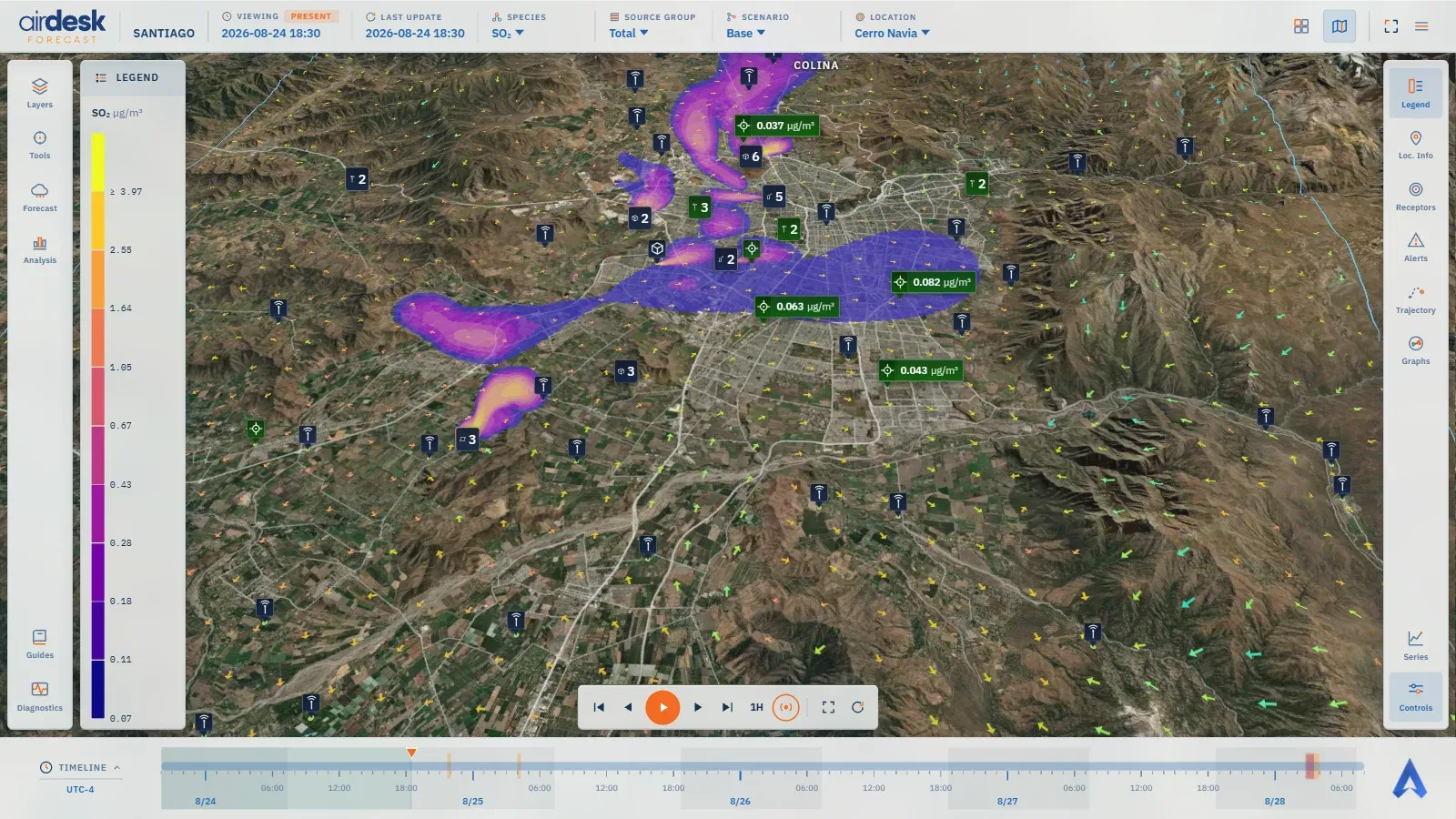
The map is where you work; the dashboard, where you study. Both read the same data, but the map is made for looking at one instant of Bali’s forecast and moving through it, with everything needed a click away and nothing covering the view.
What is drawn, bottom to top
Section titled “What is drawn, bottom to top”- The basemap — satellite, relief or map, over the terrain in three dimensions. There is always one; it is chosen in Layers.
- The domain information — the outline of the modelled grids.
- The contours — the concentration layer of the chosen species, in colour bands by the scale. It can also draw a meteorological parameter.
- The wind — arrows by default, or an animated particle flow, with adjustable colouring, length and density.
- The trajectory — a parcel’s ribbon, when one has been requested.
- Place names — text from the vector basemap, drawn above the data so it stays readable.
- The markers — sources, receptors, monitoring stations and points of interest, always on top.
The markers
Section titled “The markers”A marker is a dark glass box: a symbol saying what it is — receptor, monitoring station, source, point of interest — and, depending on the setting, the name and reading beside it. On a receptor the symbol’s colour is the alert level at the instant shown: green when nothing is exceeded, amber, red or purple for warning, alert and critical. A source and a station always wear the brand blue: they have no level, only a position and, for a station, a measured reading. When several markers fall on the same spot they cluster into one, showing the group’s worst level; when they merely touch, they grow compact. What a marker shows — symbol only, with its name, with its reading, compact — and when — always, on hover, on hover and kept by a click — is set per family in Layers.
Where a monitoring station is also a modelled receptor, Bali draws one marker, not two: the place is one, with two roles.
The top bar
Section titled “The top bar”
The top bar reads left to right: the demo’s name; VIEWING, the instant drawn, with a chip stating whether it is PAST, PRESENT or FORECAST; LAST UPDATE, the forecast cycle the data comes from; then the dimensions — SPECIES, SOURCE GROUP, SCENARIO and LOCATION with a search box. Each dimension is a picker as well as a readout; every one of them is explained in Dimensions. At its right end sit the map / dashboard switch, Full screen, and the menu — theme, Settings, account, Admin for the server’s administrators, data sources and attribution, log out.
The two rails
Section titled “The two rails”- The left rail opens windows that close on their own: Layers; Tools — the cursor readout, the maximum location and virtual receptors, its button marked with an orange dot while a tool is on; Forecast and Analysis, the forecast briefing; and at the bottom the Guides button that opens this site. A demo’s authors also see Diagnostics, a developer readout.
- The right rail toggles the panels, which stay open: Legend, Loc. Info, Receptors, Alerts, Trajectory, Graphs, and below the spacer Series and Controls. Every panel is described in Panels.
A panel can be moved to another column from its own menu, pinned, expanded into a large window or closed. The arrangement is remembered: the demo carries one, and each person can save their own from Settings → Panel Layout.
The forecast briefing
Section titled “The forecast briefing”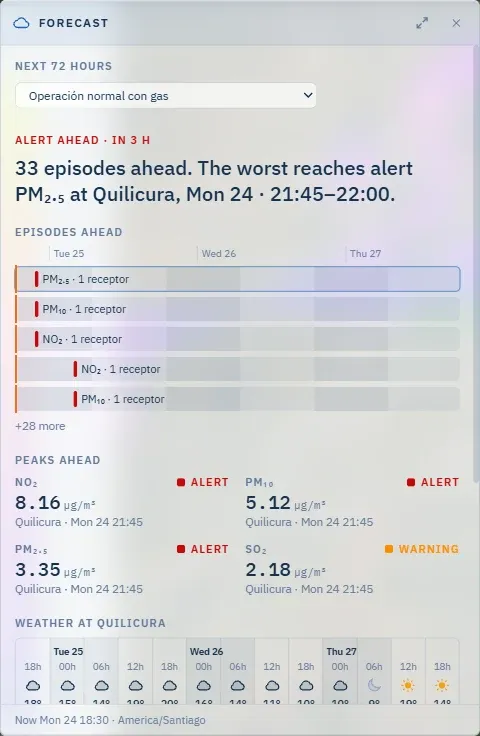
Forecast and Analysis open a sheet against the left rail, the full height of the map, with the map still live beside it. Both describe up to the next 72 hours under one scenario, picked at the top of the sheet; picking one there changes the map’s SCENARIO too, so the two always agree.
- Forecast — what is coming. A headline (Critical ahead · in 57 h) and one sentence naming the worst episode, where and when; Episodes ahead, a bar per episode on a shared time axis (the first five, then +N more); Peaks ahead, the highest value per species with its level; Weather at the worst episode’s place — sky, temperature, wind and mixing height every six hours; and Scenarios, how many episodes each plan leaves.
- Analysis — why, and what can be done. Three lines first: Situation, Cause (the source group with the largest share of the worst peak, and the weather that carried it) and Action (what curtailing that group, or switching scenario, would change). Then every episode as a card: Sources at the peak, a bar split by source group — choose one to see what curtailing it during the episode would cut; Conditions behind it; Scenarios for this episode; and Show on the map, which moves the map to the episode’s peak.
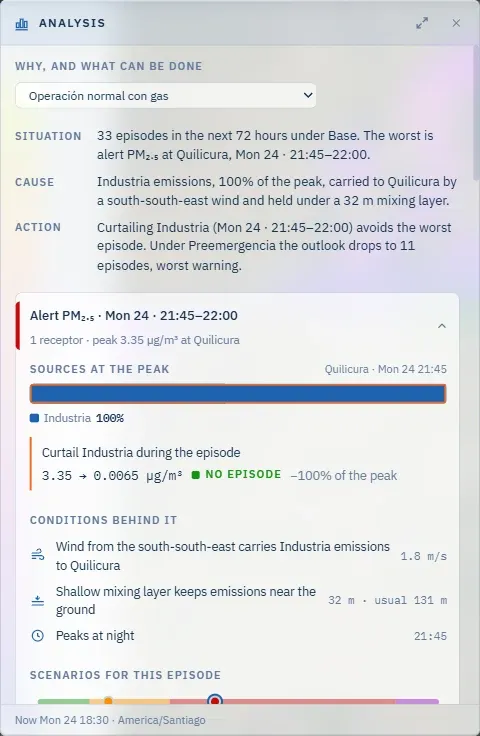
Open the full view (the arrows at the sheet’s top right) shows the same briefing across the whole window, with Forecast and Analysis as tabs, a chart of the period on one axis, and, in Analysis, Try levers — sliders that curtail several groups at once and show the combined peak. Its PDF report button downloads the whole briefing as a printable report; the dashboard’s Reports section offers the same report.
The timebar opens a third view of it: click TIMELINE and it expands into the Forecast timeline — the episodes, the worst receptor’s curve, wind and mixing height on one shared time axis, the next 72 hours, with the map’s time as its cursor; a click on it moves the map there. Its two readings are What is coming and Why, and what to do; choosing an episode on its axis explains it in place.
The timebar and the keyboard
Section titled “The timebar and the keyboard”The bar at the bottom, TIMELINE, is the instrument for moving through time; it has its own page. Four keys do the most common things without a click: ← and → step the timeline, Space plays and pauses, N jumps to the next alert and ? shows the shortcut sheet.
If the data does not load
Section titled “If the data does not load”A demo whose data could not be fetched says so in a banner over the map, with the reason, rather than sitting on an empty map. Reloading the page retries; if the banner stays, the server is the problem, not the browser.
What it does not do
Section titled “What it does not do”The map keeps nothing between sessions except what is saved on purpose: the demo’s defaults, your own saved defaults, the panel arrangement, theme and language. On reload it returns to its published values.
→ Panels · Layers · The timebar · Dimensions
Map data © OpenStreetMap contributors · © OpenMapTiles · © MapTiler · Positron design © CARTO · Esri · Copernicus DEM — Data sources and attribution