



Settings and the menu
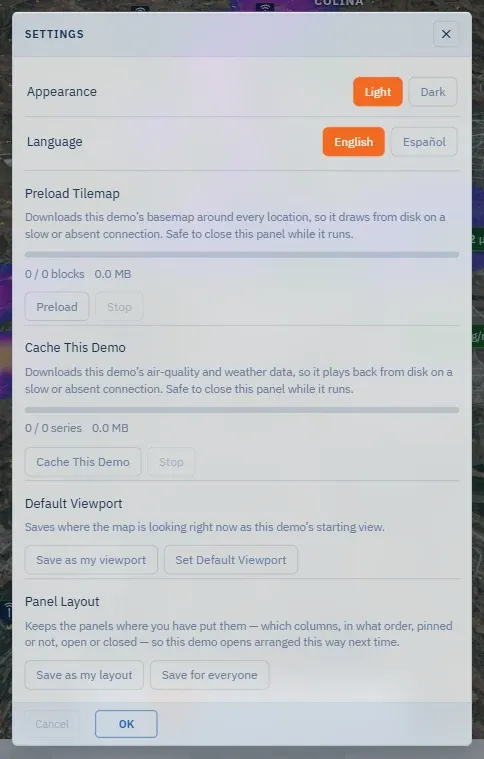
The menu at the right end of the top bar holds what is about you rather than about the forecast: Light mode / Dark mode — an action, named for where it takes you —, Settings, Account (reserved; it does nothing yet), Admin, Data sources & attribution — the credits page of this site, in the app’s language — and Log out. Admin appears only to the server’s administrators: it lists the accounts that can open the demos on this server, and adds a person, changes which demos they see, resets a password or removes them. Everything in Settings applies live, like the Layers window: Cancel is the undo, OK just closes.
Appearance and language
Section titled “Appearance and language”Appearance — Light or Dark. Language — English or Español; the choice governs the whole application and these guides, and switches with no reload. The window follows the language like everything else; only the two language names stay in their own language, so someone lost in a language they cannot read still finds their own.
Offline caching
Section titled “Offline caching”Two operations, each with a progress bar and its own Stop, safe to leave running with the window closed:
- Preload Tilemap — downloads Quintero’s basemap around every location, so the map draws from disk on a slow or absent connection.
- Cache This Demo — downloads the demo’s air-quality and weather series for the same reason.
A browser that blocks offline storage — private browsing, typically — says so in place of the bar.
Default viewport
Section titled “Default viewport”Where the map is looking right now — position, zoom, bearing, pitch — becomes the starting view. Save as my viewport needs only to be signed in and affects nobody else; Set Default Viewport, for authors, re-aims the demo for every new visitor. Reset my saved defaults clears everything you saved as your own, from here or from Layers.
Panel layout
Section titled “Panel layout”Keeps the panels where you put them — which columns, in what order, pinned or not, open or closed — so this demo opens arranged that way next time. Save as my layout is yours alone; Save for everyone is the author’s; Reset my layout returns to the demo’s.
The keyboard
Section titled “The keyboard”On the map, ? shows the sheet: ← → step the timeline, Space plays and pauses, N jumps to the next alert. Escape closes an open window or an expanded panel.
Map data © OpenStreetMap contributors · © OpenMapTiles · © MapTiler · Positron design © CARTO · Esri · Copernicus DEM — Data sources and attribution